


RealDash
3.6197.00 Reviews
App Specs
- Version
- v2.6.5-2
- Updated On
- License
- Free
- Downloads
- 500,000+
- Developer
- Napko
- Categories
- Auto & Vehicles
- Platform
- Android, iOS
Screenshots
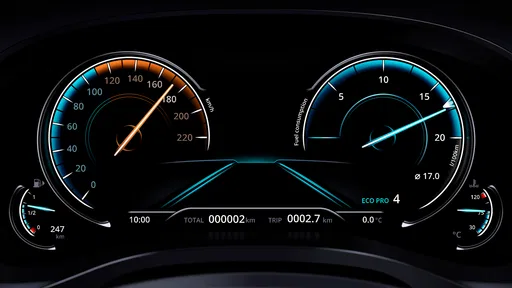
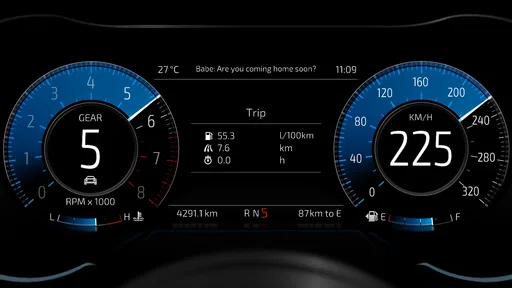
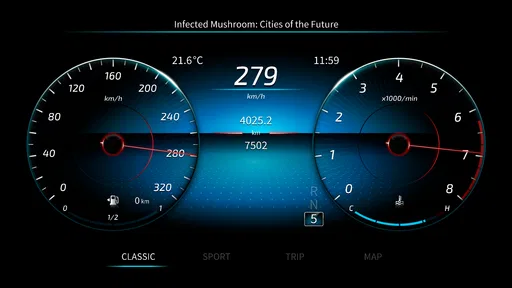
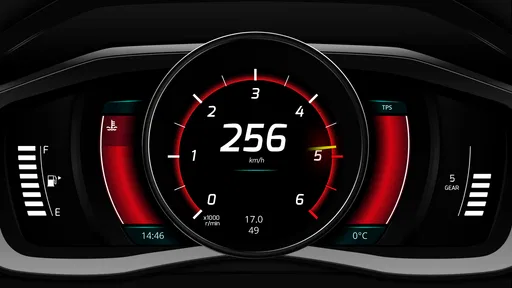
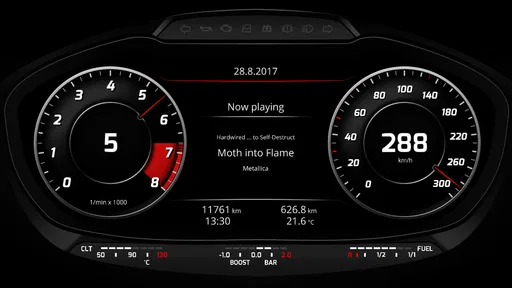
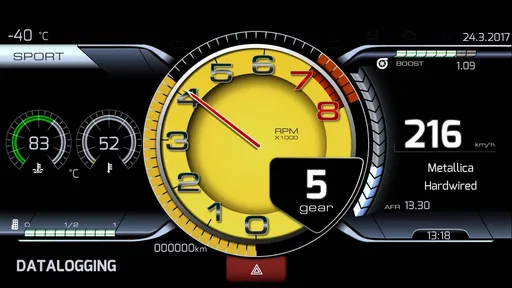
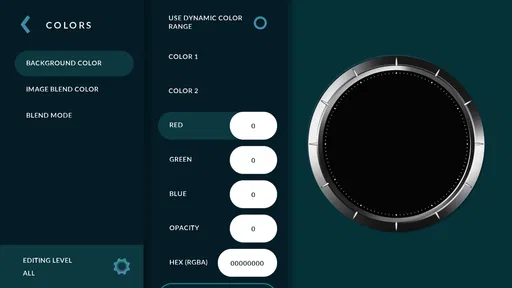
 Analysis by AppCompare
I’d treat RealDash less like a shared household car app and more like a customizable instrument panel for whoever is driving. That distinction matters when several people use the same vehicle: one person may want a clean glance at a few readings, while another may enjoy arranging a fuller display. The app is free to install, but its appeal depends on having a compatible vehicle connection and being willing to spend time making the screen useful to you.
One car, different drivers
In a realistic shared-car routine, the person who likes vehicle data could set up a dashboard before a longer trip, then leave the phone or tablet ready for the next driver. A commuter might prefer a simple layout for quick checks, while someone taking the car on a weekend drive may want a more information-rich view. The useful idea is not that the app automatically manages separate household profiles; rather, its customizable displays can suit different preferences if drivers agree on a setup.
That makes it a better fit for a household with one interested driver than for a family expecting a full coordination tool. I would decide in advance who changes the layout and when. Otherwise, a shared screen can become a small source of friction: one person adjusts gauges, another has to find their preferred view, and neither benefits while the car is moving. Set things up while parked, and keep the active display easy to read at a glance.
Set up the connection before relying on it
The central practical question is whether your vehicle and OBD2 adapter can communicate with the app. RealDash is designed to work with OBD2 connections, but “most adapters” should not be read as a promise that every adapter, vehicle, or data point will behave identically. Before planning a trip around a particular reading, test the connection while stationary and check which information your car actually makes available.
A sensible first session is to connect, confirm that the readings update, and then simplify the dashboard. It is tempting to fill the screen with every gauge that looks interesting, especially when the layout can be customized. In everyday use, though, a handful of relevant indicators is usually more practical than a wall of numbers. I’d begin with only what I expect to glance at, then add other gauges after I know they are readable and useful.
There is also a boundary worth keeping clear: a dashboard app does not replace attentive driving or a mechanic’s diagnosis. If a warning appears, treat the vehicle’s own alerts and proper inspection as the more important steps. RealDash can make vehicle information more visible, but the presence of a live reading does not by itself explain what caused a problem.
Coordination and everyday use
For a household, the most useful workflow is to agree on a stable default rather than rebuild the dashboard before each drive. One driver can create a layout that is legible for ordinary commuting, and another can change it later when parked if they have a particular use in mind. That small habit avoids fiddling with settings during a handoff and keeps the phone from becoming another distraction.
Worth Reading Before You Choose

EA SPORTS FC Mobile 26 Is a Bigger Football Game, but It Takes Time

Flipboard Shows What News Apps Must Do Beyond the Feed

Switching to Android Auto Means Rethinking Your Driving Routine

Google Calendar Makes a Crowded Week Easier to Manage

Ludo King Makes the Most of the Minutes Between Plans

Baby Panda World Brings Quick Play to Modern Phones, but Its Game Library Feels Busy
The app’s GPS support may also suit someone who likes seeing a route alongside vehicle information on a longer journey. I would treat that as an added view, not a reason to keep watching the screen. A passenger can handle route checking or dashboard adjustments; the driver should keep attention on the road. On a solo trip, a straightforward display is more valuable than constantly switching screens.
RealDash is not the same kind of alternative as a basic navigation app or a car maker’s built-in display. Navigation is generally the better choice when directions and traffic are the priority; a built-in panel is often simpler for routine driving because it is already part of the vehicle. RealDash makes more sense when the driver specifically wants a tailored view of vehicle data and is comfortable with an external adapter and some setup.
Age, trust, and shared-device boundaries
The app is rated for Everyone, but that age label is not a substitute for household rules about phones in cars. I would have an adult handle installation, adapter pairing, and any purchase decisions, then make sure younger passengers understand that the driver does not operate the screen while driving. The app is free, with optional in-app purchases listed from $1.99 to $21.99 per item, so it is worth checking purchase settings on a shared device before handing it over.
On a phone used by several people, keep the device’s ordinary account and purchase boundaries in mind. A customized dashboard does not mean each household member has a separate account or private setup. If people share one device, they also share the practical consequences of changing its display or settings. That may be perfectly manageable for a couple of regular drivers, but less convenient if many people expect independent configurations.
Napko’s app has an average rating of 3.5 from around 3,800 ratings, with about 196 written reviews. I see that as a reason to approach it with realistic expectations rather than assume every setup will be effortless. Compatibility and the amount of information exposed can depend on the vehicle and adapter combination, so a brief test before committing to a particular dashboard is the sensible move.
Getting Started with RealDash
First things first, downloading RealDash is a breeze. A quick visit to the App Store or Google Play, and you’re ready to hit the virtual road. Once installed, the app opens up with a slick, minimalistic interface that’s easy to navigate. The onboarding is straightforward, guiding you through the initial setup to connect with your vehicle’s OBD2 system. It’s like setting up a new gadget but without the hassle.
Features That Stand Out
RealDash is packed with features that are both useful and fun. You can choose from a variety of customizable dashboards, each with its own unique style. Whether you prefer a classic look or a tech-savvy digital display, there’s something for everyone. Customization is key here, allowing you to modify everything from gauge styles to color themes. It’s like having a digital canvas for your car’s data.
One of my favorite features is the real-time data tracking. You can monitor everything from speed, RPM, fuel consumption, to more advanced metrics like boost pressure and air intake temperature. It transforms your driving experience, giving you insights that are typically reserved for high-end vehicles.
Performance and Usability
In terms of performance, RealDash is smooth as butter. I didn’t experience any lag or crashes during my time with it, which is crucial when you’re using it on the go. The app is responsive, and the transition between different dashboards is seamless.
Usability-wise, it’s quite intuitive. Even if you’re not a tech wizard, you’ll find it easy to set up and use. The app supports a variety of languages, which is a nice touch for non-English speakers. Plus, there’s an active community and support system, so help is just a tap away if you ever get stuck.
Compatibility and Connectivity
RealDash works with most OBD2 adapters, which means it’s compatible with a wide range of vehicles. I tested it with a couple of different cars and had no trouble connecting. The Bluetooth connectivity is robust, ensuring that the data streaming is consistent and reliable.
What’s more, RealDash also supports GPS tracking. You can overlay your route on a map, which is great for road trips or just keeping track of your driving habits. It’s like having a little co-pilot that keeps you informed and entertained.
Final Thoughts
Overall, I’d say RealDash is a must-have app for anyone who loves to stay connected with their car’s performance data. It’s not just an app; it’s a whole experience that enhances your driving. From the plethora of customization options to the seamless integration with your vehicle, it’s clear that a lot of thought went into making this app both functional and fun.
If you’re ready to take your driving experience to the next level, give RealDash a try. It’s an exhilarating ride that you won’t want to miss!
Who I’d recommend it to
I’d recommend it to drivers who enjoy experimenting with vehicle displays, want a more personal dashboard than a standard instrument panel, and are prepared to check their adapter and car together. It can also be appealing to someone who likes looking at vehicle readings after a change in driving conditions, provided those readings are available through the connection. The version listed is 2.6.3, and the app runs on Android 5.0 or later, which makes checking device compatibility part of the decision.
I would skip it if you want a plug-and-play replacement for navigation, do not want to buy or pair an OBD2 adapter, or prefer not to configure a screen at all. It is also not the right choice for anyone expecting every vehicle to expose the same advanced metrics. A vehicle’s built-in display may be less flexible, but if it already answers your everyday questions, the extra customization may not be worth the setup.
My household verdict
RealDash is a focused choice, not an essential app for every driver. Its strongest case is a shared car where at least one person enjoys tailoring a digital dashboard and can keep a sensible, readable setup for everyone else. The practical trade-off is clear: more control over the appearance and available data, in exchange for checking compatibility and managing the display thoughtfully.
For a household considering it, I’d install it, test the adapter while parked, and create one uncomplicated layout before deciding whether deeper customization is worth the effort. The app is free to start, has been available since April 15, 2016, and has more than 500,000 installs. Those figures suggest an established audience, but the deciding factor for me would still be the experience with your own vehicle. If a simple, stable data display sounds enjoyable, it is worth trying; if you just need directions or a no-setup screen, a conventional navigation app or the car’s own display is likely the better fit.
Pros
- Highly customizable dashboard setup.
- Supports multiple vehicle profiles.
- Real-time data monitoring.
- Works offline without issues.
- Integrates with OBD-II devices.
Cons
- Initial setup can be complex.
- Limited free version features.
- Interface may overwhelm beginners.
- Occasional connectivity drops.
- Requires purchase for full access.
FAQs for RealDash
What is RealDash and what can I use it for?
RealDash is a highly customizable virtual dashboard app designed for vehicles. It allows users to create and display real-time data from their car's sensors, such as speed, RPM, and fuel levels. It can be used with OBD-II, ELM327, and other compatible devices, making it a versatile tool for car enthusiasts and everyday drivers alike.
Is RealDash compatible with all vehicles?
RealDash works with most vehicles that support OBD-II protocols, a standard feature in cars manufactured after 1996. However, compatibility may vary depending on the specific vehicle model and the OBD-II adapter being used. It’s always recommended to check your vehicle's specification or consult with the manufacturer for confirmation.
Does RealDash require an internet connection to function?
RealDash primarily functions offline and does not require an internet connection to display data from your vehicle. However, an internet connection may be necessary for initial setup, downloading dashboard templates, and accessing certain online features, such as cloud backup and data sharing.
How customizable is the RealDash interface?
RealDash offers extensive customization options, allowing users to create personalized dashboards with various gauges, indicators, and themes. Users can adjust the layout, colors, and graphics to match their preferences, making it not only functional but also visually appealing. This flexibility is one of the app's standout features.
What devices are compatible with RealDash?
RealDash is available for both Android and iOS devices. It requires a smartphone or tablet with Bluetooth or Wi-Fi capabilities to connect to an OBD-II adapter. The app is optimized for a wide range of device resolutions, ensuring a smooth and responsive user experience across different platforms.


